Introduction to FDS
1. Introduction to FDS
Flash Data Store (FDS) is a lightweight logical data storage system that is mainly used to store user data in Flash (internal and external Flash) to ensure that the data will not be lost when power is lost, and to facilitate the retrieval and reading of the data, including storing, updating, reading, and deleting of the stored data entries;
GR5xxx platform mainly involves three modules: NVDS, APP FDS, and APP Log Store. Here we mainly introduce the storage applications for lightweight data (such as configuration information, user information, etc.) and log data, while the storage of large files such as dials will be introduced in the following special article when it comes to the storage of large files in smart wearable;
2. NVDS application notes
NVDS module GR5xxx default integrated storage module, mainly used to store BLE binding-related information and system calibration/configuration information, to Key-Value entries chained storage, which:
BLE stack occupancy tag: 0x8000 - 0x8fff
System occupancy tag: 0xc000 - 0xcfff
Storage structure in Flash, as follows occupies Flash space for a number of consecutive Sectors, where a special MAGIC is placed at the start of the first SECTOR to identify if this area is also initialized as NVDS.Each Item of NVDS is composed of Item Header and Item Data;
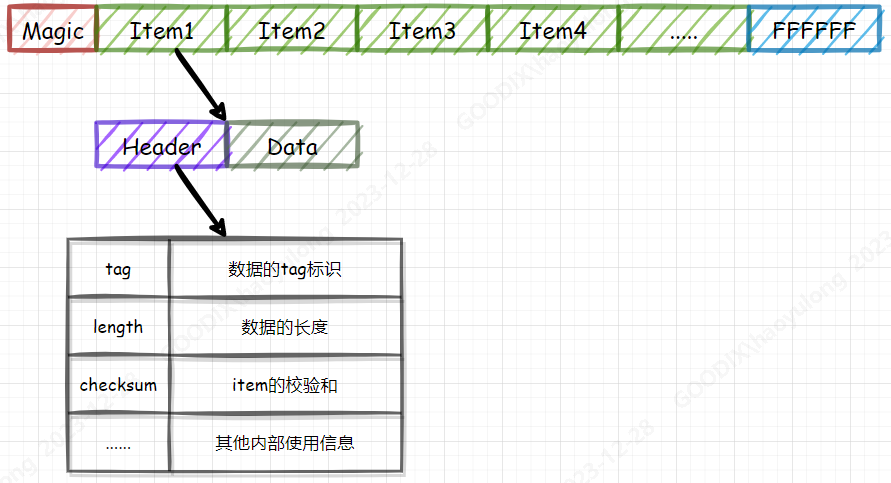
Item Read (nvds_get), as introduced above, each Item’s Header will record the length of its Data, so by Item n can be found to Item n+1, that is, the address of Item n + Header fixed length + Item n data length, which can be interpreted as a “single linked table It can be understood as the logic of “single linked table” to find data. Therefore, each Read operation reads Item Header one by one from the starting position of NVDS, and determines whether its tag is the target tag, and if so, reads out its data;
Item Write (nvds_put), when it is necessary to write Item to NVDS, it will confirm whether the Item with corresponding tag already exists:
If it exists, and the stored data is the same as the data to be written, no operation is performed, and success is returned;
If it exists, but the stored data is not consistent with the data to be written, it will be appended in the NVDS area as a new Item, and the Tag in the original Item Header will be written to all 0, (0x0000 is the deleted tag,);
If it does not exist, it is appended in the NVDS area as a new Item;
It is known that when Flash data is written, it can only change from 1 to 0. Therefore, when Item is updated, it can not be updated at the original Item position, but appended at the end, so it will generate garbage/fragmented data (Item with Tag 0x0000). As Item is continuously appended until NVDS End Address, it is necessary to recycle the garbage/fragmented data to free up the free space. The NVDS GC
NVDS GC (garbage/fragmented data recovery), when GC is performed, each NVDS Sector data is read to the transit area in turn, and after the Sector is Erased, the valid data in the transit area is written to the Sector that has been Erased, and the garbage/fragmented data is ignored, and the GC is not performed by the user’s own initiative, but is performed in the process of Write, and it finds that there is enough free space (garbage/fragmented data). Free space is enough (garbage/fragmented data will be counted into the free space), but the tail space is not enough will be triggered automatically.
Note: The staging area of GR551x platform is RAM space, which can save Flash space, but it does not have the power-down protection during GC process; besides, the staging area of other platforms is Flash space, which has the power-down protection during GC process, but it will take up extra 4KB Falsh space.
Limitations on NVDS use **Not reentrant, non-threaded.
Non-reentrant, non-thread-safe;
All operations are blocking, including the GC process, so the larger the area allocated by NVDS, the longer the GC takes;
Interrupts will be turned off frequently during the GC process because valid Items need to be written back sequentially (the GR5xxx platform Flash Write and Erase processes will turn off global interrupts); * System power-down or reset may cause the system to lose power.
System power down or reset may cause data loss in NVDS;
**Analysis of the reasons for NVDS data loss
NVDS can operate normally under the condition that the storage structure is complete as above, any one of the Item is destroyed, it will lead to the failure of the NVDS integrity check, and can not be recovered, only to re-initialize the NVDS area, resulting in the loss of the original data;
The cause of Item destruction or incompleteness occurs when the system power down and reset during NVDS put and GC process, because FLash driver operation is not an atomic operation, power down during write/erase operation will cause Flash data not as expected;
**Impact on BLE link stability during NVDS GC **
As mentioned above, NVDS GC will judge the validity of each Item and write it, at this time, it will frequently operate Flash and turn off the global interrupt.
When the global interrupt is turned off, the BLE Stack interrupt can not respond, although the operation gap opens the global interrupt for the BLE Stack interrupt execution, but the BLE Stack Event execution has timing requirements, the delayed response will not execute the BLE Stack event, which may lead to the BLE Stack in the air interacting with Bypass, and ultimately disconnected links
Precautions for using NVDS **Store lightweight data as much as possible.
Try to store lightweight data, and try to allocate smaller NVDS storage space, the larger the storage space, the longer it will block the execution time during GC;
Do not store frequently updated data to avoid frequent generation of data fragments that need to be recycled;
BLE link parameter Timeout is appropriately configured with a larger value under allowable conditions to avoid timeout and chain breakage during NVDS GC;
3. APP FDS Application Notes
APP FDS is mainly an alternative solution for NVDS when there are some limitations in its use, and its implementation is Little FS;
Little FS is a lightweight file system designed for embedded systems. It is designed for low-memory and flash devices, providing efficient storage solutions with features such as low resource consumption, power-down protection, and wear-leveling;
To facilitate rapid porting, an abstraction layer is built to provide Key-Value APIs named
app_fds_init,app_fds_value_write,app_fds_value_read,app_fds_value_delete,app_fds_ traverse, which can be implemented as a direct replacement for the original NVDS storage requirements, and can use either int or string Tag;Resource footprint:
Code size: ~16kB Ram: ~1.8kB
Design to circumvent NVDS limitations:
Each Item will have a revision field, the larger the newer, when updating Item, it will not update the information of the old Item, even if power down during updating, the next new Item data will be used according to the revision;
GC is not a one-time recovery of the entire storage area fragments, but according to the storage situation, organize the minimum number of demand Sector, and do not need a staging area, similar to ping-pong Sector data handling;
Usage is as follows:
Initialization: allocate at least two Sectors, e.g.: app_fds_init(0x010a0000, 4);.
Write data:
if ((ret = app_fds_value_write(record_id[i], (uint8_t *)&record_val[i], 4)) < 0)
{
    printf(“fail [%d] %d\r\n”, __LINE__, ret);
}
Read the data:
if ((ret = app_fds_value_read(record_id[i], (uint8_t *)&read_val, 4)) < 0)
{
    printf(“fail [%d] %d\r\n”, __LINE__, ret);
}
Delete Item :
if ((ret = app_fds_value_delete(record_id[i])) < 0)
{
    printf(“fail [%d] %d\r\n”, __LINE__, ret);
}
Iterate over Item :
app_fds_traverse(app_fds_traverse_cb);
void app_fds_traverse_cb(uint32_t key, uint32_t length, bool* is_continue)
{
    printf(“key: %d, length:%d\r\n”, key, length);
    *is_continue = true.
    if (app_fds_value_delete(key))
    {
        while(1);
    }
}
4. APP LOG Store Application Notes
APP LOG Store is mainly for the storage system runtime log storage, using cyclic coverage to save the latest log storage, support for various ways to export, such as Uart, BLE, etc., configure it yourself
Use the following methods:
Initialization: Here, the RTC is initialized, so that the timestamp information will be added to the log store.
static void get_timestamp(app_log_store_time_t *p_time)
{
    app_rtc_time_t time.
    app_rtc_get_time(&time);
    p_time->year=time.year;
    p_time->month=time.month;
    p_time->day=time.date; p_time->hour=time.
    p_time->hour=time.hour; p_time->min=time.
    p_time->min=time.min; p_time->sec=time.
    p_time->sec=time.sec; p_time->msec=time.
    p_time->msec=time.ms;
}

static void app_rtc(void)
{
  app_rtc_time_t time; app_rtc_init(NULL); app_rtc_init(NULL)
    app_rtc_init(NULL);
    app_rtc_time_t time; app_rtc_init(NULL); time.year = 23; time.mon = 2; app_rtc_init(NULL)
    app_rtc_time_t time; app_rtc_init(NULL); time.year = 23; time.mon = 2; time.date = 13; app_rtc_time_t
    app_rtc_time_t time; app_rtc_init(NULL); time.year = 23; time.mon = 2; time.date = 13; app_rtc_time_t
    app_rtc_time_t time; app_rtc_init(NULL); time.year = 23; time.mon = 2; time.date = 13; time.hour = 8; app_rtc_time_t time
    time.min = 0; app_rtc_init(NULL)
    time.sec = 0; time.
    time.week = 0; time.
    time.ms = 0; app_rtc_init_time(&time)
    app_rtc_init_time(&time);
  }

static void log_store_init(void)
{
  app_log_store_info_t store_info; app_log_store_op_t op_func; app_log_store_op_t op_func
  app_log_store_op_t op_func;
  store_info.nv_tag = 0x40ff; store_info.
    store_info.db_addr = FLASH_START_ADDR + 0x60000; store_info.
	  store_info.db_size = 0x20000; store_info.
    store_info.blk_size = 0x1000; op_func.flash_init = 0x20000; store_info.
    op_func.flash_init = hal_flash_init; op_func.flash_init = hal_flash_init; op_func.
    op_func.flash_erase = hal_flash_erase; op_func.
    op_func.flash_write = hal_flash_write; op_func.
    op_func.flash_read = hal_flash_read; op_func.
    op_func.time_get = get_timestamp; op_func.
    op_func.sem_give = NULL; op_func.sem_give = NULL
    op_func.sem_take = NULL; op_func.
    app_rtc();
    app_log_store_init(&store_info, &op_func);
  }
Log store:
Requires enabling
APP_LOG_STORE_ENABLEincustom_config.h;Only log storage using print macros such as
APP_LOG_xxxis supported, i.e. logs printed by printf will not be saved;
Log export :
After calling
app_log_store_dump, APP LOG Store will be opened to read the stored logs, and throw out the data through the registered dump callback to be processed by the application layer.For the dump data user can choose their own communication method to export;
uint16_t app_log_store_dump(app_log_dump_cbs_t *p_dump_cbs);
To avoid blocking the execution of store and export, background execution is used, so the user also needs to call the following in the background task, no main while(1):
void app_log_store_schedule(void)